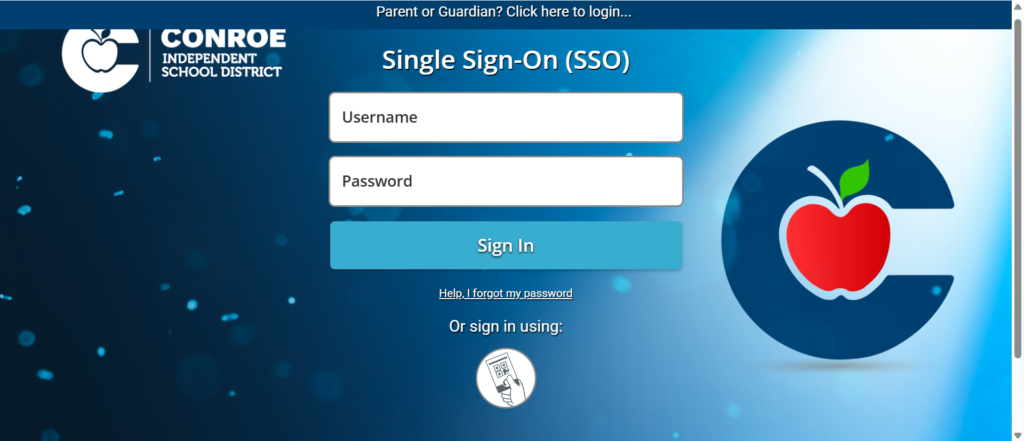

Managing multiple usernames and passwords for different educational platforms can quickly become frustrating. To simplify digital access, Conroe Independent School District (CISD) uses CISD SSO (Single Sign-On), a secure login portal powered by ClassLink. It allows students and employees to access many district applications with just one username and password.
Whether you’re a student accessing online lessons, a teacher managing classroom resources, or a staff member checking district tools, CISD SSO serves as the central gateway to essential educational services.
What Is CISD SSO?
CISD SSO (Conroe ISD Single Sign-On) is a secure authentication platform that enables authorized users to sign in once and access multiple district applications without entering separate login credentials for each service.
The district uses ClassLink LaunchPad as its SSO platform. Once users log in successfully, they can open approved educational apps and district resources from one dashboard.
This centralized approach saves time while improving both convenience and account security.
How Does CISD SSO Work?
The system authenticates a user’s district account and then grants access to all approved applications connected to that account.
For first-time users, the setup generally includes:
- Logging in with temporary credentials.
- Creating a permanent password.
- Setting up Multi-Factor Authentication (MFA) for eligible staff.
- Configuring password recovery options.
After setup, future logins require only one secure sign-in to access available district resources.
Main Features of CISD SSO
Several features make CISD SSO an important digital service within Conroe ISD.
Single Login Access
One username and password provide access to multiple district applications.
ClassLink Dashboard
All available learning apps appear in one organized location.
Secure Authentication
Employee accounts include Multi-Factor Authentication to strengthen security.
Password Recovery
Users can configure personal recovery methods to regain account access if they forget their password.
Cloud-Based Access
Authorized users can access district resources from school or home using an internet connection.
Benefits for Students
Students are among the biggest beneficiaries of the CISD SSO platform.
Instead of remembering multiple passwords, students use a single login to reach learning resources quickly. This reduces login issues and allows more classroom time for learning.
Additional student benefits include:
- Faster access to educational applications
- Simplified online learning
- Reduced password confusion
- Access from home and school
- Organized learning dashboard
- Support for QuickCards in supported student accounts
Benefits for Teachers
Teachers rely on numerous digital tools every day. CISD SSO simplifies this process considerably.
With one secure login, teachers can reach instructional resources, classroom platforms, district applications, and communication tools without repeatedly signing in.
Advantages include:
- Improved classroom efficiency
- Less time spent logging into multiple systems
- Centralized access to instructional resources
- Better account security
- Simplified password management
Benefits for Staff
District employees also benefit from CISD SSO.
Employee accounts can securely access district services including Outlook email and internal applications through the ClassLink portal. Password management and MFA help protect sensitive district information.
Common staff benefits include:
- Enhanced cybersecurity
- Protected employee accounts
- Convenient password recovery
- Centralized application access
- Reduced IT support requests
Why Schools Use Single Sign-On
Educational institutions increasingly use Single Sign-On because it improves both security and usability.
Instead of maintaining separate credentials for every application, users authenticate once through a trusted identity provider.
This approach offers several advantages:
- Fewer forgotten passwords
- Improved digital security
- Simpler user experience
- Faster classroom access
- Lower administrative workload
For large school districts like Conroe ISD, SSO helps thousands of users access educational technology more efficiently.
How to Log In to CISD SSO
Accessing CISD SSO is straightforward once your account has been activated.
Follow these basic steps:
- Open the official CISD SSO (ClassLink) login page.
- Enter your assigned district username.
- Type your secure password.
- Complete Multi-Factor Authentication (MFA) if prompted.
- After successful authentication, the ClassLink dashboard will open with all applications assigned to your account.
Students and employees should always use the official district login portal to protect their accounts.
How to Reset Your Password
Forgotten passwords are one of the most common login issues. Fortunately, CISD SSO includes a self-service password reset option.
To reset your password:
- Click “Help, I Forgot My Password” on the login page.
- Enter your district username.
- Verify your identity using your configured recovery method (email or SMS).
- Create a new password that meets the district’s security requirements.
- Sign in again using the new password.
Keeping recovery information updated makes password recovery much easier.
Multi-Factor Authentication (MFA)
One of the strongest security features of CISD SSO is Multi-Factor Authentication (MFA).
Instead of relying only on a password, users verify their identity using an additional authentication method.
Available methods include:
- Google Authenticator (recommended)
- SMS verification
- Image authentication (available for some accounts)
This additional layer significantly improves account protection against unauthorized access.
Applications Available Through CISD SSO
Depending on the user’s role, the ClassLink dashboard may provide access to various educational and district services.
Commonly available resources include:
- Google Workspace for Education
- Microsoft Outlook (for employees)
- Canvas or other learning platforms (where assigned)
- Library resources
- Digital textbooks
- Assessment platforms
- Educational learning applications
- District communication tools
The exact applications displayed vary based on the user’s permissions.
Common Login Problems
Even a reliable system like CISD SSO may occasionally present login challenges.
Typical issues include:
Forgotten Password
Use the password recovery feature.
Incorrect Username
Verify your district-issued username.
Expired Password
District passwords expire periodically and must be updated. ClassLink passwords for staff expire every 90 days.
MFA Problems
If you changed your phone or cannot receive verification codes, update your MFA settings or contact the district help desk.
Missing Applications
Some apps appear only after account synchronization or based on assigned permissions. The district provides troubleshooting guidance for missing apps.
Security Tips
Keeping your CISD SSO account secure is essential.
Follow these recommendations:
- Use a strong password.
- Never share login credentials.
- Enable and maintain MFA.
- Update recovery email and phone information.
- Log out on shared computers.
- Avoid signing in from untrusted public devices.
- Change your password if you suspect unauthorized access.
These practices help protect both personal information and district systems.
Why CISD SSO Is Important
As schools continue to expand digital learning, having one secure access point simplifies technology use for everyone.
CISD SSO helps by:
- Reducing login time
- Improving cybersecurity
- Supporting remote learning
- Providing centralized access
- Reducing password-related support requests
- Improving productivity for teachers and staff
- Creating a better student learning experience
Its combination of convenience and security makes it an essential part of Conroe ISD’s technology infrastructure.
Future of CISD SSO
Educational technology continues to evolve, and Single Sign-On platforms are becoming increasingly sophisticated.
Future improvements may include:
- Enhanced identity verification
- Expanded cloud integration
- Improved mobile access
- Additional educational application support
- Advanced security monitoring
- Faster authentication technologies
These developments will continue to improve both user experience and account protection.
Conclusion
CISD SSO serves as the secure digital gateway for students, teachers, and staff within Conroe Independent School District. By providing one login for multiple educational applications, the platform simplifies daily access while strengthening account security through features such as Multi-Factor Authentication and password recovery.
Whether users are completing assignments, teaching classes, or managing district operations, CISD SSO offers a reliable and efficient way to access essential online resources. Following recommended security practices and keeping account information current ensures a smooth and secure experience throughout the school year.
FAQs
1. What is CISD SSO?
CISD SSO is the Conroe Independent School District Single Sign-On portal that allows authorized users to access multiple district applications with one secure login.
2. Who can use CISD SSO?
Students, teachers, administrators, and other authorized district employees can access the platform using their district credentials.
3. What should I do if I forget my password?
Use the “Help, I Forgot My Password” option on the login page and follow the verification steps to create a new password.
4. Why does CISD SSO use Multi-Factor Authentication?
MFA adds an extra layer of security by requiring a second verification step in addition to your password, helping protect accounts from unauthorized access.
5. Can I access CISD SSO from home?
Yes. Authorized users can sign in from home using an internet connection and their district-issued login credentials, subject to district security policies.