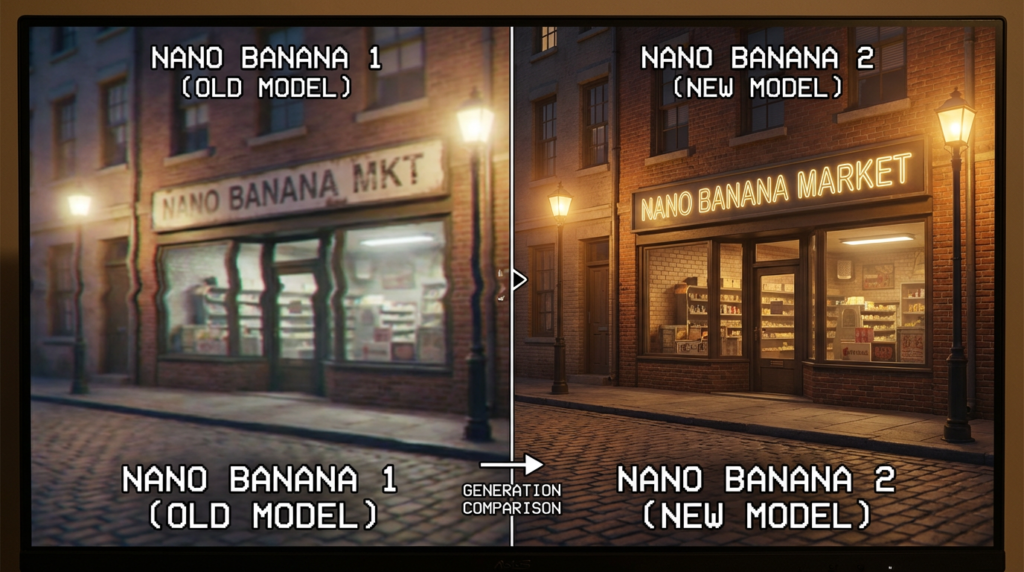

Choosing between two AI image generators isn’t necessarily the one that renders the most realistic image anymore. Prompt accuracy, ease of editing, image generation speed, and uniformity across image batches matter as much as anything to marketing and design professionals when creating digital content.
With a choice between Nano Banana Pro and Nano Banana 2 side-by-side, the choice would really depend on the level of preciseness and speed required by the project at hand. Both AI image generators use Google’s Gemini image technology. This Nano Banana Pro review looks at where each model earns its place
Nano Banana Pro vs Nano Banana 2: Core Differences
Nano Banana Pro with the help of Gemini 3 Pro Image is aimed at performing complicated tasks. That is why they include such characteristics as precision and accuracy as well. As for Nano Banana 2 that is built on Gemini 3.1 Flash Image, it does not include these characteristics, but it offers speed instead. The information about capabilities and applicability of the two models is included in their documents available on Google’s website.
In case you would like to try Nano Banana Pro free before committing, but not switch back and forth constantly, you could compare different AI image models and use the one that suits your particular needs. The difference between these models lies in their simplicity – one of them is suitable for complex tasks, while the other one is made for productivity.
Nano Banana Pro Features: What Justifies the Pro Model?
However, there are certain characteristics that begin to make sense only when an image starts to contain multiple aspects, each of which has to match the other.
Reasoning and Composition. While composing images beforehand, Nano Banana Pro understands complicated instructions. This is very important when an instruction contains the explanation on positioning of the products, the type of the light needed, typography, hierarchy of the visuals, and correlation between multiple objects. For example, let us assume a group of advertisers who try to produce a hero image for a product – the design, background and props should be positioned according to the instruction.
Text Rendering. Most important thing about Nano Banana Pro text rendering is that it is very helpful in designing graphics, infographics, packages, and editorial layout. Although any text rendered in the image will need proofreading afterwards, a layout model saves a lot of efforts here.
Resolution and Detail. The maximum resolution of Nano Banana Pro is 4K, making it suitable for high-detail assets and large-scale creative work. However, a large number of pixels does not mean that the image is ready to be printed. Aspect ratio, composition, typography, and production parameters matter as well.
Image Editing. Nano Banana Pro image editing makes it possible to tweak the visual idea gradually using natural language instructions. You may want to change lighting, move an object, or redesign the background without going back to square one.
All of these factors combine to create the following key features of the main Nano Banana Pro advantages: better management of complex compositions, more accurate visuals, and high-quality assets suitable for professional use.
Image Quality and Speed
Nano Banana Pro vs Nano Banana 2’s image quality comparison is not a straightforward issue of premium versus budget version. The latter software can also generate complex images, work well with prompts, and generate images in HD format. There is little visual difference when it comes to creating everyday images for social media, lifestyle, or products.
The visual difference becomes noticeable when the prompts become difficult. The reasoning of Nano Banana Pro is beneficial in case there are multiple restrictions on an image. It is often preferable to use Nano Banana 2 in case several concepts are needed quickly and only one of them should be chosen.
Also worth mentioning is the speed of Nano Banana Pro generation. With its intensive processing, the generation can be rather slow, depending on the prompt provided. The new version of Nano Banana gives preference to speed and fast iterations to allow exploring more creative ideas in the same period of time. Latency will be determined by the specific prompt, output settings, and user interface used.
It should be noted that the new version of Nano Banana does not operate in low resolution only. The image is generated at a high resolution level, and the decision should depend on complexity only.
Best Nano Banana Pro Use Cases
Use cases for Nano Banana Pro revolve around projects in which any error will prove expensive or when detailed instructions cannot be avoided:
- Advertising & campaign visuals: precise product placement, control of light and hero images composition.
- Infographics & editorial visuals: compositions combining illustrations, labeling and informational graphics.
- E-commerce creatives: product scenes requiring consistent look and detailed editing.
- Content for branding: graphics containing a few elements requiring certain creative direction.
Nano Banana 2 seems to be a great choice when quick social media design is required, variations in the design, brainstorming sessions and rapid experimenting are needed. Ten campaign ideas could be generated by the small marketing team using Nano Banana 2 and only the best two moved on to Pro for further polishing.
Nano Banana Pro Limitations: Which Model Is Better?
Despite its many positives, Nano Banana Pro’s limitations involve increased generation time, along with the possibility that complicated prompts could return mistakes as well. A human will be needed to verify the output, especially in the case of images that contain specific information about the product or legal language that the brand relies on.
Nano Banana 2 could require several iterations if the particular project requires highly accurate composition and specific visual control, but its speed makes those iterations affordable. Thus, which Nano Banana should you choose? It is recommended to use Pro if you value composition, instructions, and accuracy of the production. If speed and flexibility are more important, then go for Nano Banana 2.
When it comes to Nano Banana Pro model comparison, workflow efficiency is the main factor to consider. For most teams, the best way forward will be to use Nano Banana 2 in an exploratory phase and Pro in case of assets requiring strict control. Thus, selecting a model stops being a question of competition between the generators.
Read More From Magazinepanda